Hands on 2K MSI MAG 273QP QD-OLED X24 27 inch WQHD 240Hz HDR screen
Executive Briefing
Synthesized and verified with gemini-2.0-flash-thinking-exp
“*“Make your victory a reality with the MAG 273QP QD-OLED ensuring extremely vivid images and minimiz”
Key Takeaways
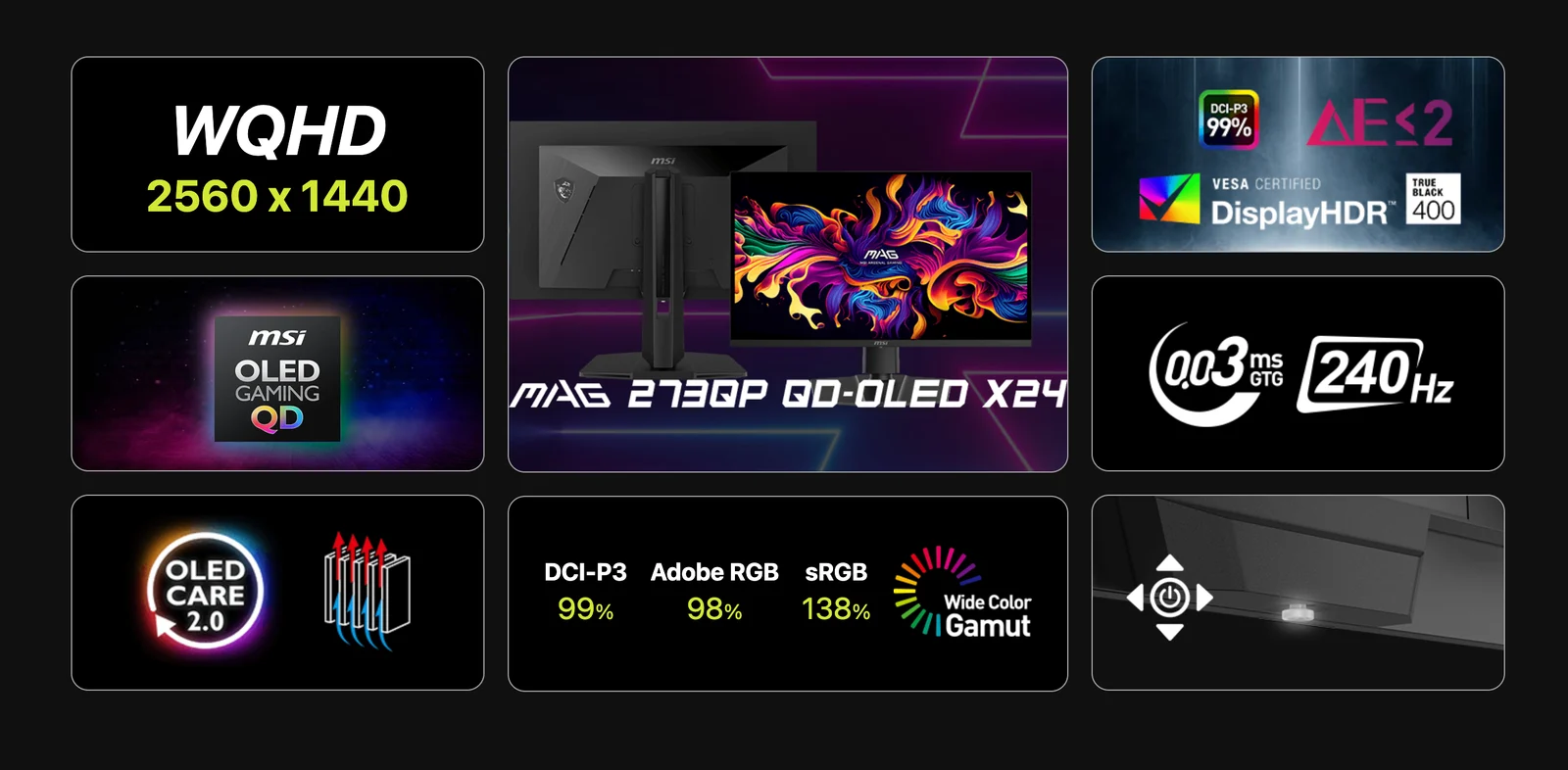
- 1.*“Make your victory a reality with the MAG 273QP QD-OLED ensuring extremely vivid images and minimizing motion blur.
- 2.OLED Care 2.0 minimizes the risk of burn-in on OLED displays.
- 3.For console gamers, the MAG 273QP QD-OLED X24 is equipped with an HDMI 2.1 port with 48Gbps bandwidth, supporting 120Hz, VRR and ALLM.”* This is information from the MSI Vietnam homepage when they introduced this screen.
“Make your victory a reality with the MAG 273QP QD-OLED ensuring extremely vivid images and minimizing motion blur. OLED Care 2.0 minimizes the risk of burn-in on OLED displays. For console gamers, the MAG 273QP QD-OLED X24 is equipped with an HDMI 2.1 port with 48Gbps bandwidth, supporting 120Hz, VRR and ALLM.”
This is information from the MSI Vietnam homepage when they introduced this screen.
I'll list some notable company introductions:
Because it is a Gaming monitor, it is required to have parameters that help users experience a more advanced and accurate game, providing colors that increase the realism and vividness, in addition to ensuring eye protection. MSI MAG supports Console modewhen experiencing games on professional gaming consoles. The monitor is equipped with 02 HDMI ports and 01 DisplayPort port to help you connect more devices. Because of the relatively thin design, the arrangement of the power supply can make the MSI screen thicker, so perhaps they decided to make an external adapter to save space and weight for the screen.
My criteria when choosing an external monitor:
I am an Apple user through and through, of course choosing an external working monitor is a difficult task, because my Macbook Pro M3 Pro 16" 2023 (M3 Pro 12 CPU 18 GPU 36GB RAM 1TB SSD) is big enough, beautiful colors are Apple's advantage. I only have one choice:
- Too sour because it's too expensive: Buy Apple's own external monitor (Apple Studio Display or Apple Pro Display XDR or this duo of monitors newly launched in early 2026).
- It's too difficult because you're used to the Macbook screen: Buy an external screen that's not from Apple, but it still has to have equivalent beauty or other advantages to trade off.
I finally chose the screen
MSI MAG 273QP QD-OLED X24 27 inch WQHD 240Hz HDRbecause of the following reasons. This bolded phrase that interests me is:
- The screen will have a scanning frequency and refresh rate of 240Hz
- 27inch QD-OLED panel
- Supports HDR content display
Quick comparison:
Then I had to compare those two parameters, the Macbook Pro and this MSI MAG, to see their difference. Details about these two panels are as follows:
MSI MAG 273QP QD-OLED X24 27 inch WQHD 240Hz HDR Monitor:
Using QD-OLED (Quantum Dot OLED) panels is a new generation hybrid screen technology developed by Samsung Display, combining the infinite contrast and absolute black of OLED with the high brightness and brilliant color range of quantum dots (Quantum Dot). This technology uses self-emitted blue light combined with a color conversion layer, overcoming the low brightness disadvantage of traditional OLED.
Outstanding features of QD-OLED technology:
Superior visuals: Combines the deep blacks of OLED and the high brightness, vibrant colors of Quantum Dot. Advertisement
Innovative structure: Using blue OLED as the main light source and quantum dot layer to convert into basic colors (Red - Green - Blue), no need for color filter, helping to increase brightness and purity.
Advantage:
High brightness: Competes with LCD/LED screens, supports HDR content better. Vivid colors: Wide color coverage, up to 99.8% DCI-P3 color gamut.
Super wide viewing angle: Images without color distortion at tilted angles.
Fast response speed: Ideal for gaming.
QD-OLED is considered the top screen technology today, promising to bring the most realistic and vivid visual experience.
MacBook Pro 16-inch screen (from 2021 onwards)
Featured with Liquid Retina XDR technology using Mini-LED panels, delivering 1600 nits peak brightness, 1,000,000:1 contrast and 120Hz ProMotion scan frequency. This 16.2 inch screen has a resolution of 3456 x 2234, supports P3 wide color range, True Tone and Nano-texture glass options. Advertisement
Key technologies on MacBook Pro 16" screen
Mini-LED panel (Liquid Retina XDR): Uses thousands of microscopic LED bulbs, providing outstanding brightness (1000 nits continuous, 1600 nits peak HDR) and deep blacks. ProMotion 120Hz: Adaptive refresh rate from 24Hz to 120Hz, for smooth page scrolling and graphics, while saving power.
Resolution & Pixel Density: 3456 x 2234 pixels, 254 ppi, delivering extremely detailed images.
Color: Supports P3 wide color gamut and True Tone technology (automatically adjusts color according to the environment).
For Apple users who are used to screens with high brightness SDR 500nits, XDR maintained 1000nits and HDR 1600nits, MSI MAG's SDR 250nits and HDR 450nits brightness is a huge difference.
But never mind, ads, specifications are all over the homepage and reviews from other users, I will ignore other information, just focus on the main ideas, and get a real feel for them. I filmed with Sony ZVE10ii, I'm not good at taking photos, I hope you can understand.
Game experience with PC and Macbook output from MSI screen:
The question is "A gaming Mac...where can I buy a Gaming monitor?". Macs have never had a window with Windows when it comes to games, from game developers to popular app stores. But for me, if I see a game that is a little heavy but has support on macOS and Windows, I buy it to experience it. Luckily, I chose the game Capcom's Resident Evil 3, which I downloaded on the Apple Store. In this game, I set maximum only 120Hz, output image via HDMI port from Macbook Pro 16inch, on the contrary, in Windows with this same game, of course 240Hz output is comfortable.
When the Macbook is sleeping, it will not display the screen. As long as you have HDMI plugged in, the MagSafe charging pin, the machine will automatically display the screen.
Personal experience when using a Macbook to experience gaming with this MSI MAG screen:
- Apple M3 Pro configuration 12 Cores CPU 18 Cores GPU / 36GB RAM / 1TB SSD
- No difference when experienced on Mac due to the same scanning frequency of 120Hz
- There is a big difference in black and dark areas. On the MSI screen, this area feels like it's completely turned off
- Larger display space, of course (27inch vs 16inch)
Personal feeling when using a PC to experience gaming with this MSI MAG monitor:
- I used in the test the MSI NVIDIA GTX1060 6GB OC GPU, a quite old model but still providing relatively good performance (Resident Evil 3 somewhere around 120 FPS, Call Off Duty 233 FPS)
- There is a big difference in black and dark areas. On the MSI screen, this area feels like it's completely turned off
- Larger display space, of course (27inch vs 16inch)
Experience working with Macbook Pro exporting MSI screen:
Macbook Pro when outputting the MSI screen when working will be 240Hz. In fact, for personal experience, this is not meaningful, but especially when working with Final Cut Pro, with the advantage of large space and "absolute black" screen, the experience of watching and editing videos is better.
Experience high-resolution, HDR video content with MSI display output PC:
I tried demoing a screen different from the MSI screen in the condition of turning off all the lights. The first strong point I immediately saw was that the black area and the surrounding dark area almost blended together, feeling like the black area of the screen panel was completely turned off and inactive.
Color video of MSI MAG with surrounding background:
Then I opened a video testing the panel with colors including Red, Green, Yellow and black to experience the colors (On the right is the MSI MAG screen and on the left is the Dell UltraSharp office screen). This comparison is lame because office monitors will have a hard time competing with gaming monitors. However, compare to see the difference in the background panels and how different the colors are. (See more videos of colors)
Watch more color comparison videos here:
Lifting and joystick buttons:
The MSI MAG screen has an angle of elevation - lowering, left and right rotation as well as other screens. Because it is covered with plastic, it is relatively rickety, but that's okay, note that when adjusting the vision you should not touch the screen panel because it leaves fingerprints quite deep and is difficult to clean. The most perfect operation (see video):
- When raising and lowering: Hold the middle of the top and bottom edges of the screen in the center position and adjust
- When rotating left or right: Hold the edge of the screen with both hands and move
Video Game Play on Mac (~119fps) and Windows (~240pfs):
Windows:
macOS:
Conclude:
As an Apple user for a very long time, with many options out there that are relatively difficult, with the familiar bright and beautiful screen style of the Macbook, the MSI MAG 273QP QD-OLED X24 27 inch WQHD 240Hz HDR screen meets my criteria as follows:
For macOS:
- The blacks are very deep, especially the red, blue and yellow are very colorful, helping me experience high-resolution movies on a large 27-inch screen very well.
- Option to expand the workspace to a larger size (27 inches compared to 16 inches) while still retaining 120Hz Promotion via the HDMI port on Macbook for a seamless experience
- I bought a bunch of heavy games on the Apple Store, Steam supports the macOS platform, I plugged them all into the Hub, the gaming experience on Mac is also fun (recommended to use a 3rd party mouse button rather than the Magic Keyboard or Magic Mouse keyboard set because the game experience is bad)
- I like making movies with Final Cut Pro the most, I have larger space
- I use a Macbook with a RainDesign shelf, I just need to connect the HDMI port, plug in the Hub and MagSafe charger, I have escaped the constraints of the Mac's accessory ecosystem, working completely with third-party screen mouse buttons. After finishing work, take the Macbook out and take it away.
For Windows system:
- I haven't played games before. It's probably only been about 5 years since I started playing side-scrolling and survival role-playing games. The old Dell Ultrasharp monitor is used for working, sometimes playing, but 60Hz is not very good compared to 240Hz (of course), like I "care" more about gaming, it brings a new flow of experience, better colors, higher Hz, bigger screen.
- Whatever you say, the same game is Resident Evil 3 on macOS and Windows, on the same MSI MAG screen, Windows always gives a very different experience
Personal opinion:
MacOS is now famous for not playing games, even though there are still many good games with good plot effects. Mac games now have quite a lot of options. If you use Mac-er with this MSI, you will enjoy the same feeling as me. As for making photos and movies, which is the advantage of Mac, you probably have to go through the screen color calibration step, because this MSI MAG is much more colorful than the Macbook screen, it's just not as bright. As for this one on Windows, it's okay, very suitable. And also note that this MSI MAG has quite a few lines, and mine is the 273QP
MSI MAG 273QP QD-OLED X24 27 inch WQHD 240Hz HDR I bought at Memoryzone before Tet 2026, you can see more at: