Quick experience of MSI's 5th generation QD-OLED screen, what's new?
Executive Briefing
Synthesized and verified with gemini-2.0-flash-thinking-exp
“**MSI MPG 341CQR QD-OLED **Design and stand worth the price** If you have ever used MPG 341CQPX or”
Key Takeaways
- 1.**MSI MPG 341CQR QD-OLED **Design and stand worth the price** If you have ever used MPG 341CQPX or MAG 341CQP, you will find the X36 familiar at first sight.
- 2.It's still rough black plastic interspersed with glossy patches, the back has a scratched metal finish with a glossy logo in the middle, the screen border is thin and the body is surprisingly thin for a curved panel, only about 7 mm on both edges.
- 3.Under the chin of the screen is a small strip containing the AI Care logo and sensor.
**MSI MPG 341CQR QD-OLED
Design and stand worth the price
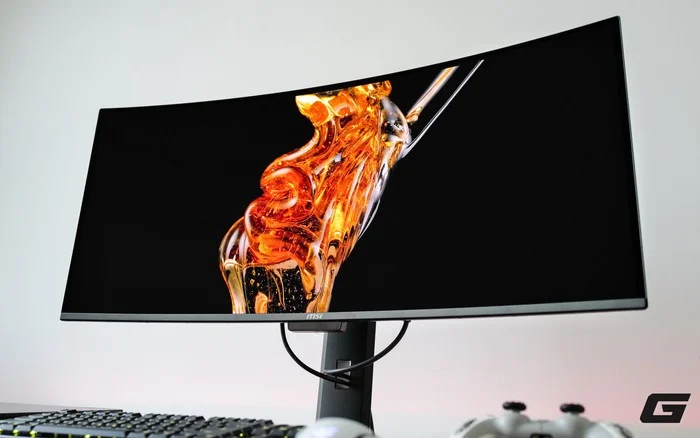
If you have ever used MPG 341CQPX or MAG 341CQP, you will find the X36 familiar at first sight. It's still rough black plastic interspersed with glossy patches, the back has a scratched metal finish with a glossy logo in the middle, the screen border is thin and the body is surprisingly thin for a curved panel, only about 7 mm on both edges. Under the chin of the screen is a small strip containing the AI Care logo and sensor. The RGB lights are very restrained, just a few patterns around the logo at the top and can be turned off completely in the menu.
Small changes with the biggest impact are at the base. The previous bulky Y-shaped leg was replaced with a flat, thin metal base, reducing the area occupied by the table by up to 62%. This number sounds like an advertisement until you pull the mechanical keyboard close to the screen without getting in the way of the stand. The stand allows for 110 mm of lifting, tilting from minus 5 degrees to 15 degrees, rotating left and right 30 degrees on each side, and has a slight vertical rotation of 10 degrees that with a 21:9 ratio that not many people need. The machine weighs about 7.77 kg with the feet attached and can still use a 100 x 100 VESA mount.
The stand is easy to install and has holes to comfortably thread the cord.
What's special about 5th generation panels?
The panel is manufactured by Samsung Display, a 5-layer tandem with EL Gen 3 technology, providing a luminous efficiency increase of about 30% compared to before. Higher brightness is the most visible change when gaming and viewing HDR content, but the more fundamental improvement lies in pixel layout.
Early QD-OLED panels arranged pixels in a triangular shape, causing color fringing around high-contrast details, and that was the reason many people hesitated when switching to OLED. This generation switched to RGB Stripe, which means three red, green, blue pixels arranged in vertical stripes like traditional IPS panels, so color fringing is completely reduced and fine details in games such as wires, wire mesh or small patterns appear cleaner.
The pixel density is around 110 PPI, equivalent to a 27-inch QHD screen, which is very suitable for normal sitting distances for gaming and watching movies, and also helps the graphics card easily achieve high frames at 1440p ultrawide resolution.
The surface coating has also been upgraded with the name DarkArmor Film. The hardness increased from 2H to 3H, so users also worry less about scratches when cleaning the screen. At the same time, the coating absorbs environmental light better, giving about 40% deeper black color and 2.5 times more scratch resistance.
Color and HDR
Out of the box, the screen is very well calibrated. Refer to KitGuru's measured results, white balance is around 6,270 K, about 4% deviation from the 6,500 K mark, gamma is close to 2.2 and grayscale error is only 1.38 Delta E. The color range covers nearly 99% DCI-P3 and about 95% Adobe RGB, wide enough for wide color content to appear fully. The screen is available in sRGB, Adobe RGB and Display P3 simulation modes with an average error of less than 1, so when you need standard colors, just switch modes.
SDR brightness is fixed at about 300 nits, the lowest brightness is about 37 nits, which is comfortable enough for watching movies in a dark room, and the screen does not flicker even at minimum brightness levels.
With HDR, the monitor is DisplayHDR True Black 500 certified and this mode is enabled by default. Brightness is kept around 500 nits in small bright areas, reduced to about 400 nits when half the frame is white and 300 nits in the full screen, giving a stable HDR effect, without sudden drops in brightness. If you want to see what the panel can do, switch to Peak 1300 nit mode. In the 5% white area of the screen, the peak brightness reaches exactly about 1,300 nits, while the 10% area drops to about 750 nits. In the game, explosions, sparks or neon lights appear brightly and have great depth, especially in detailed dark scenes. On the contrary, bright outdoor scenes are still OLED's inherent weakness, where the screen cannot be as bright as a mini-LED.
Experience watching movies on ultrawide OLED
The 3440 x 1440 screen has a ratio of nearly 2.39:1, coinciding with the frame of most movies, so when watching movies in full screen there are almost no extra black bands at the top and bottom like on a 16:9 screen. This sounds small but is felt very clearly, as the image fills the field of vision and the 1800R curvature naturally pulls the viewer into the scene.
The black quality of OLED is the biggest advantage here. Each pixel self-illuminates so dark scenes are truly black, there are no halos or glow phenomenon at off-angle viewing like on IPS or VA panels, and wide viewing angles almost do not change color or contrast when sitting at an angle. Night scenes, outer space or caves therefore have a depth that is difficult to achieve with LCD screens. In the default HDR True Black 500 mode, the brightness is stable so the scene does not have unusually bright or dark flashes. If you want to push small bright spots such as street lights or sparks higher, you can try Peak 1300 nit mode.
However, there are two things to note when watching movies with this screen. First, the device does not have a built-in speaker but only has a headphone jack, so you need headphones or a separate speaker set. Second, in a room with lots of daylight, the 300 nit SDR level will be a bit underwhelming and the black color will be raised by environmental reflections. Watching at night, this is no longer a problem.
360 Hz, 0.03 ms and gaming feel
This is where the screen shows up most clearly. 360 Hz on an ultrawide panel is rare, plus OLED's 0.03 ms GtG response time and VESA ClearMR 18000 certification for motion clarity. In fact, when quickly rotating the viewing angle, surrounding details remain sharp instead of blurring into streaks like on an IPS screen. The monitor supports G-Sync Compatible and FreeSync Premium Pro with VRR range from 48 to 360 Hz, and has a console mode that supports VRR and ALLM so you can still take advantage of it by plugging in a console. Of course, to reach full 360 Hz at 3440 x 1440, you need a powerful enough graphics card, but with eSports games like CS2, that's not a problem.
MSI also has an MPRT mode that reduces blur by cycling the backlight off, but this mode produces 180 Hz flicker and is almost unnecessary once the OLED panel is free of motion blur. With single-player games, the 21:9 vision and curvature bring a distinctly immersive feeling, especially in open-world and racing games.
AI Crosshair - the crosshair changes color automatically and thanks to that, AWP has the focus even when... the viewfinder is not turned on
In the AI tool cluster located at the first item of the menu, the thing that makes me most curious is AI Crosshair. This is a crosshair overlaid on the screen at the hardware level, but the difference is that it automatically changes color according to the image background below. Anyone who has played games where the crosshair defaults to a white sky or red wall will understand the value of having the crosshair always contrast with the background.
I tried it with CS2 and the effect was very surprising. Whether on bright walls or golden sand, the crosshair still stands out and saves your eyes from having to look for it amid stress, and of course it also helps you get the decisive moment in life-or-death situations in the game.
In addition to being easier to see, this feature has another interesting point. Normally, AWP has no focus when the viewfinder is not open, but with AI Crosshair, the viewfinder is still available on the screen, meaning you can align the line of sight even without "zooming". Just kidding, it's also a little "cheat".
Because this is a tool that sits on the screen and does not interfere with the game, it is essentially a hardware feature. However, if you compete in a serious tournament, you should carefully review the organizers' regulations on the overlay crosshair before turning it on. As for daily rankings, that is a valid advantage in the true gaming monitor sense.
Besides, there is also AI Vision, which automatically adjusts brightness and saturation according to each scene to reveal more details in dark areas. This feature is useful for first-person shooter games with many hidden corners, but those who like to keep the original color can leave it off.
AI Care Sensor and solution to burn-in worries
Burn-in is always the first question of anyone planning to buy an OLED screen and MSI answers with the OLED Care 3.0 package, in which the highlight is the AI Care Sensor on the bottom edge of the screen. A CMOS sensor takes pictures every 0.2 seconds, combined with an NPU chip to detect whether someone is sitting in front of the screen or not. When leaving the table, the screen dims or turns off completely depending on the setting, limiting the static image remaining on the panel for a long time. All processing takes place right on the device, without storing or sending images anywhere, which people concerned about privacy will feel more secure about.
Most importantly, MSI offers a 3-year warranty and includes burn-in. For users who often leave the screen running movies or games for many hours, that is the most convincing reason to choose an OLED without having to sit and count every hour of use.
Connectivity and included features
The port cluster is located in a small cavity under the stand, including one DisplayPort 2.1a (UHBR13.5), two HDMI 2.1, one USB-C DP Alt mode with 98 W Power Delivery, two USB Type-A ports, one USB Type-B port to connect to the computer and a headphone jack. All three image ports reach 3440 x 1440 at 360 Hz. Both HDMI 2.1 and DisplayPort 2.1a cables are included in the box, so you don't have to buy extra.
The 98W USB-C port can both broadcast television and charge laptops. Combined with KVM, you only need one set of mouse and keyboard for both desktop and laptop. The screen also has PIP and PBP, and the OSD menu is neatly reorganized, controlled by a 5-way joystick on the back with two buttons next to it, one is the power button and the other is a reassignable shortcut. Gaming Intelligence software on Windows allows you to adjust everything with the mouse.
Conclusion
The MSI MPG 341CQR QD-OLED X36 is not a revolution in design, but it is a big step forward in the exact places that OLED users have been complaining about for years. Color fringing is reduced, colors are more standard, brighter, faster, and there is also a 3-year warranty for burn-in. A few things to consider are that 300 nit SDR will be more suitable for spaces with little direct light, devices without built-in speakers, and bright outdoor scenes, which are the general limits of OLED technology. For eSports gamers who want the wide vision of an ultrawide without sacrificing speed, or those who both play games and love watching movies, this is almost a no-brainer choice. If you mainly do office work with lots of small text, a 4K screen may be more suitable.
As for the writer, after playing CS2 games holding the AWP and running freely with the crosshair changing color automatically, I still haven't decided whether this is a "cheat" or a technological advantage we should take advantage of. But one thing is for sure, this screen makes me much more interested, wanting to experience a few more games and watch a few more movies right after completing this article.