Bits and bytes: from states 0 and 1 to terabyte hard drives, how computers count data
Executive Briefing
Synthesized and verified with gemini-2.0-flash-thinking-exp
“Every photo, song or message on your phone is saved as a very long string of 0s and 1s.”
Key Takeaways
- 1.Every photo, song or message on your phone is saved as a very long string of 0s and 1s.
- 2.Each such digit is a bit, the smallest unit of information in computers and digital communications.
- 3.Gathering 8 bits together, we have a byte, the unit that RAM, hard drives or 4G packages use to calculate capacity.
Every photo, song or message on your phone is saved as a very long string of 0s and 1s. Each such digit is a bit, the smallest unit of information in computers and digital communications. Gathering 8 bits together, we have a byte, the unit that RAM, hard drives or 4G packages use to calculate capacity.
These two units have their own history, and the fact that 1 kilobyte is equal to 1,000 or 1,024 bytes still makes many people wonder when they see that a 1 TB hard drive only shows about 931 GB on Windows.
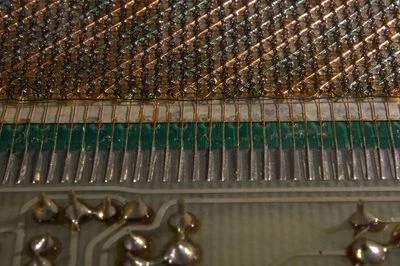
Magnetic-core memory: each small ferrite ring stores a bit equal to its magnetization, technology popular in the 1950s and 1960s
What is Bit
Bit stands for binary digit, which means binary digit. A bit can only take on one of two values, usually recorded as 1 and 0, and can also be understood as true or false, on or off. According to Britannica, in computer memory, 1 can correspond to high voltage and 0 to low voltage; Wikipedia notes that assigning a value to a physical state is just a convention.
The word "bit" first appeared in print in the article
A Mathematical Theory of Communication, 1948 by Claude Shannon. Shannon notes that the word was suggested by John W. Tukey; Tukey shortened "binary digit" to "bit" in a memo at Bell Labs on January 9, 1947.
Where is a bit located in the device
Anything that has two clearly distinct states can contain a bit:
- Perforated card: each position has a hole or not, an idea that has been used in weaving machines since the 18th century.
- Magnetic core memory, magnetic tape, hard drive: magnetization direction of a material area.
- DRAM and SSD: charge level in capacitor or floating gate transistor.
- CD, DVD: with or without a microscopic hole on the reflecting surface.
From bits to bytes
Two bits give 4 combinations (00, 01, 10, 11), three bits give 8, each additional bit doubles the number of combinations. With 8 bits, we have 2⁸ = 256 combinations, enough to represent numbers from 0 to 255. Each position is a power of 2, from 128 on the left to 1 on the right; Add up the active positions to get the number.
Illustrative diagram: 8 bits count from 0 up, then 65 (letter A in ASCII code table) and maximum value 255
The word "byte" was coined by IBM engineer Werner Buchholz in June 1956, when designing the IBM Stretch computer. He intentionally turned "bite" into "byte" to avoid being confused with "bit". Initially, Stretch's bytes were from 1 to 6 bits long depending on the purpose.
Many machines in the 1960s still used 6 or 9 bit bytes. The turning point was the IBM System/360 line launched in 1964, which fixed bytes at 8 bits and addressed memory by byte. The popularity of the System/360, followed by 8-bit microprocessors in the 1970s, made 8-bit the de facto standard.
Advertisement
IBM System/360 Model 30 at the Computer History Museum (USA). The System/360 series contributes to making the 8-bit byte a common standard
One byte is enough to contain a basic Latin character: according to the ASCII code table, the letter "A" is the number 65, ie 01000001. Vietnamese letters have more accents: in UTF-8 code, the letter "ă" occupies 2 bytes, the letter "ê" occupies 3 bytes.
Kilobyte equals 1,000 or 1,024 bytes
Because memory is organized in powers of 2, and 2¹⁰ = 1,024 is very close to 1,000, the computer world early on called 1,024 bytes a kilobyte. According to NIST, this designation is fine when used only by professionals, but when the capacity reaches gigabytes and terabytes, the gap becomes larger: 2.4% at the kilo level, nearly 10% at the tera level.
In December 1998, the International Electrotechnical Commission (IEC) adopted a separate set of prefixes for binary multiples: kibi (Ki, 2¹⁰), mebi (Mi, 2²⁰), gibi (Gi, 2³⁰), tebi (Ti, 2⁴⁰), while kilobyte (kB) is only used for exactly 1,000 bytes. In fact, the two ways of counting remain parallel:
- Hard drive, SSD, memory card: manufacturers use system 10, meaning 1 GB is 1 billion bytes and 1 TB is 1,000 billion bytes.
- Network speed: also calculated in base 10 and in bits, so a 100 Mbps package is equivalent to a maximum of 12.5 MB per second.
- Windows and RAM capacity: still count according to system 2 but write symbols KB, MB, GB.
- macOS and iOS: Apple used system 2 to OS X Leopard and iOS 10, then switched to system 10.
Advertisement
Illustrative diagram: the difference between hexadecimal and hexadecimal counting increases with each prefix level, the reason why a 1 TB drive is currently about 931 GB on Windows
So a 1 TB (10¹² byte) drive appears to be about 931 "GB" on Windows, which is actually 931 GiB. No bytes are lost; The actual amount of space taken up comes from the drive format and operating system, as Apple explains. Lawsuits in the US surrounding this, according to Wikipedia, mostly ended in favor of the manufacturer.
From a magnetized ferrite ring to today's SSD of several terabytes, everything still boils down to two states: 0 and 1. What has changed is the way they are gathered and how people name increasingly large numbers.
Source:
Wikipedia (Bit)
,
Wikipedia (Bytes)
,
Britannica
,
NIST
,
Apple Support