Return to your childhood with the TrimUI Brick Pro retro gaming console
Executive Briefing
Synthesized and verified with gemini-2.0-flash-thinking-exp
“Handheld game consoles were even more of a luxury at that time.”
Key Takeaways
- 1.Handheld game consoles were even more of a luxury at that time.
- 2.Having a separate device to carry around and turn on to play at any time was something many people only dared to wish for.
- 3.Seeing someone holding a small Nintendo in their hands, the whole crowd often gathers to watch.
Handheld game consoles were even more of a luxury at that time. Having a separate device to carry around and turn on to play at any time was something many people only dared to wish for. Seeing someone holding a small Nintendo in their hands, the whole crowd often gathers to watch. Just being loaned to play for a few minutes is enough to keep you excited all day.
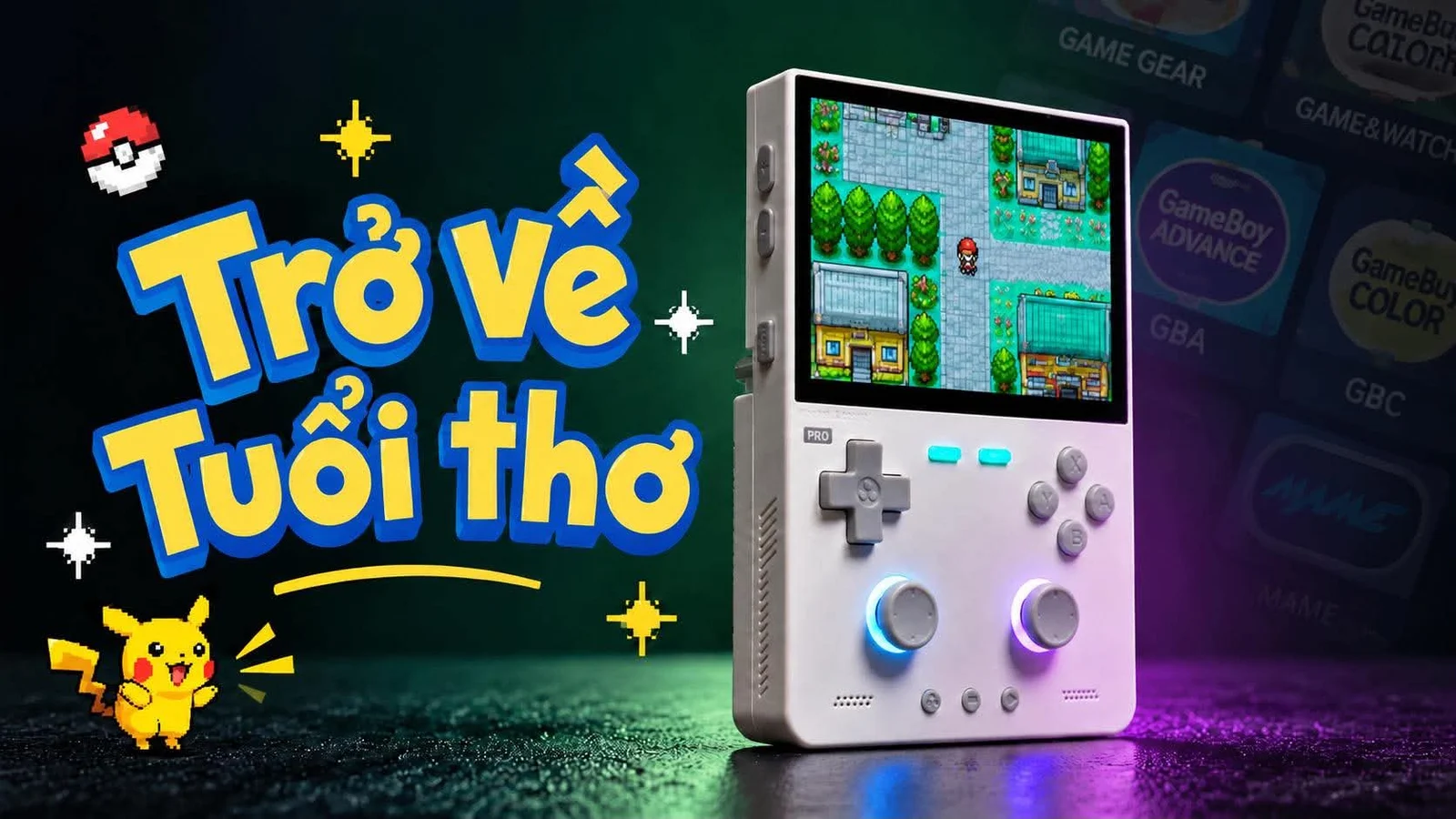
And then I accidentally saw this TrimUI Brick Pro handheld game console, which strongly reminded me of my childhood memories. I can't resist the design that is both modern and nostalgic, the screen is big and beautiful, the buttons are familiar, and it emulates retro games associated with my childhood.
And then the opportunity came, I was lucky enough to successfully watch the sale and sell it for only 1.2 million VND.
For those who don't know, TrimUI Brick Pro is a handheld game emulator. Simply put, it is a small device that can rerun games from many older systems such as NES, SNES, Game Boy, Game Boy Advance, Mega Drive, PS1 or Arcade. Instead of having to buy each old machine and the corresponding game cartridge, you just need to go online to download the game file, copy the game file to the memory card, put it in the correct folder and then turn on the device and choose to play. The device already has emulation software to read and run these games, so everything is quite like opening a childhood game library in the palm of your hand.
EXTERIOR DESIGN
TrimUI Brick Pro is the latest upgraded version of the previously released TrimUI Brick line. In terms of appearance, TrimUI Brick Pro still retains the vertical, square handheld game console design and has a hint of the Game Boy style of the past. The white version in the photo looks quite minimalist, the ABS + PC plastic shell feels sturdy, not too shiny. Dimensions are 130×86×22 mm, weighing about 236 g, so the device is no longer pocket-sized like the old Brick version, but fits better in the hand and has enough room for two analog sticks.
The front is a 3.95 inch IPS screen, 1024×768 resolution with 4:3 ratio, very suitable for old game systems. The screen is pressed close to the glass so it looks clear, the colors are bright and clear, and may surprise you the first time you look at it.
Below is still a familiar layout with a plus-shaped D-pad on the left, a round A/B/X/Y key cluster on the right, and small function keys in the middle. The D-pad has a moderate bounce, and the front key cluster also feels clear to the hand, not too hard.
The most obvious difference on the Pro version compared to the previous version is the two joysticks located on the bottom half of the device, each side has an RGB light ring that can customize the color according to your preferences. This is a Hall Effect joystick that uses a magnetic sensor, so in theory there will be no "stick drifting" like joysticks that use variable resistors after a long time of use.
Advertisement
The upper back of the device is a heat dissipating metal piece, below the handle there are horizontal ribs, which both create a highlight of the old electronic device style and help keep it from being too slippery. The shoulder keys L1 R1 L2 R2 are designed in the form of a trigger so they feel very easy to press. The USB connection port and decorative lights are arranged in many places to create a unique and authentic look of a retro machine remade in a more modern direction.
INSIDE HARDWARE
When you open the device, you will see that on the board is the Allwinner A133P chip, with 1GB of LPDDR3 RAM and 8 GB of eMMC memory integrated into a chip manufactured by Samsung. This configuration is not aimed at very heavy systems, but is stable enough for most retro game stores. Using built-in memory also helps the device boot and run its own operating system, while games and additional applications can be copied to the memory card.
Advertisement
The most notable point is the pair of Hall Effect joysticks. Inside each joystick there is a magnetic sensor instead of the traditional contact mechanism, reducing the risk of the stick drifting after long periods of use. The two joysticks are connected by a soft cable, can be pressed down, are defined as L3/R3 in the operating system, and come with an RGB light ring. Many people say that although the joystick is of high quality, the joystick's travel is quite short, so it can cause some difficulties when you need to play games that require the joystick's precision.
In the picture we can see that the D-pad is in the shape of a cross, while the ABXY keys are four separate keys, with rubber pads underneath to help. The bounce and feeling of pressing will depend heavily on this rubber membrane.
The device is equipped with a 5,000 mAh lithium battery, equivalent to 18.5 Wh, allowing continuous gaming time of up to 7-8 hours. The USB-C port on the bottom edge is responsible for charging and connecting to a computer to copy data. The USB-C port on the back is a host port to plug in accessories such as controllers, USBs or peripherals. The two ports have clearly separated roles so it is more convenient to use, especially when charging and connecting another device. There is also a memory card slot, 3.5 mm headphone jack, reset button and two stereo speakers.
On the main board we also see the XR829 chip and antenna wire, responsible for Wi‑Fi 2.4 GHz standard 802.11 b/g/n and Bluetooth 4.2. The position above this antenna is also equipped with a row of RGB LED lights to create a highlight for the device, attracting the eyes of people around you when you take out the device to play.
The power circuit uses IC AXP717, but for users, the simple thing to remember is that the device supports charging via USB-C 5V/2A port, capacity of about 10 W. Therefore, to charge the device, you should use the phone's 5V charger and then use the USB-A to C cable to charge the device, which is most reasonable. You should avoid using fast chargers with USB-C ports, avoid using C to C cables to avoid damaging the device's hardware.
SOFTWARE AND EMULSIONS
TrimUI Brick Pro runs the company's own customized Linux operating system, not Android or some other strange OS as many people often mistake. The main interface is quite simple, turn on the device and see a list of platforms, you just need to select the game and play. Thanks to that, new users will not have to spend too much time getting used to the machine. The system part is located in the 8GB eMMC internal memory, which is where the bootloader, kernel, drivers, system interface and core operating system part are located. The included memory card is where the game, cover art, emulator and related settings are stored.
This method is quite convenient, when you want to copy more games, just plug the device into the computer or remove the memory card, without having to interfere with the operating system. Company updates are also separated, so you can update your device without losing your game library. If you accidentally copy the wrong custom ROM, just take out the memory card, then the device can still boot thanks to the core components of the operating system that have been placed in the internal memory.
With stock ROM, most internal emulator systems will run through RetroArch, while some systems that require specific configuration such as PSP, Nintendo DS, Game Port will use a more suitable emulator. The best gaming capabilities still lie in familiar childhood systems such as NES, SNES, Game Boy, Game Boy Advance, Mega Drive, Arcade (arcade games) and a few light PS1 games. But you shouldn't put too much hope in the N64, Dreamcast or PSP systems, although you can still play some games, they are only suitable for light titles or when you take the trouble to tweak the settings, otherwise the experience will be quite bad.
PREPARE MEMORY CARD
To get started, you need a microSD card formatted FAT32 if capacity is less than 32GB or exFAT if capacity is more than 32GB. You should use a genuine memory card, do not use a cheap, unbranded memory card, because the stability of the device during use will depend greatly on the quality of the memory card you use. Using a poor quality memory card will often cause the device to reset itself while playing, or worse, the device won't recognize the card and will lose all data. After preparing the memory card, we need to find the SD_Base_Package corresponding to the TrimUI Brick Pro model. This is the background data set for TrimUI Brick Pro to recognize and run games from the memory card. This package is not the operating system of the device, but includes emulator folders, RetroArch, preconfiguration, cover art and ROM folder structure for each system.
It sounds complicated, but actually you just need to go to the company's github page (https://github.com/trimui/assets\_brickpro/releases/tag/v1.0.0-20260626) to download the latest sd_base.7z file to your device. Then unzip and copy all the folders inside to the memory card and you're done.
HOW TO COPY GAMES INTO TRIMUI BRICK PRO
Once the memory card has the SD Base Package, you just need to open the Roms folder and copy the game to the correct folder for each system. For example: Game Boy Advance games copied to Roms/GBA; NES games copied to Roms/FC; SNES games copied to Roms/SFC. Similarly, Game Boy uses GB folder, Game Boy Color uses GBC, Mega Drive uses MD, PlayStation 1 uses PS, PSP uses PSP. After copying, insert the card into the device and restart and the game will appear in the corresponding system section.
I will list some sites you can go to to download the game. Note about copyright and security issues, I will not be responsible if you encounter problems, so please consider before downloading.
- The first page is game.toposhop.vn
- Another international community site is romsfun.com
- Team Viet Hoa has many aow.vn game systems
- For Pokemon fans like me pokeharbor.com
SOME BASIC SETTINGS
Wi-Fi connection: Go to Settings then select Wi-Fi, turn on Wi-Fi and wait for the device to scan for surrounding networks. Select the network you want to use, enter the password and confirm. Brick Pro only uses 2.4 GHz Wi-Fi, so if your home is separating 2.4 GHz and 5 GHz networks, remember to choose the correct 2.4 GHz network. Once connected, the device can automatically synchronize the time and use features that require the network.
Bluetooth connection: In Settings > Bluetooth, turn on Bluetooth first, then put the headset or controller into pairing mode and then search for the device from the device. When the accessory name appears, select to connect. Then you can play games and listen to music via Bluetooth headphones by opening the player, playing your favorite song and then hiding the music player so it runs in the background. Finally, open the game you want to play and enjoy.
Screen adjustment: The Display section allows changing brightness, contrast, saturation, color temperature and exposure. If you just need a quick adjustment, you can use the combination START + L1 to reduce brightness and START + R1 to increase brightness. With color, you should adjust each item one by one and increase or decrease gently; Just change the saturation or color temperature a little and the screen is quite different. If you accidentally over-adjust, just return the parameters to default and start again.
Connect to computer: To copy games without removing the memory card, go to Applications > USB Storage on Brick Pro first, then plug the USB-C cable into the bottom port of the device and the computer. The memory card will now appear as a storage drive to copy ROMs, cover images or edit files. After copying, remember to exit the USB Storage on the device and safely disconnect it from the computer before unplugging the cable to limit memory card errors.
Calibrate the joystick: If you see that the joystick is off-center, does not move completely, or the character walks on its own even without touching the stick, go to Settings > System > Calibrate Joystick. Place the device still when starting, follow the instructions on the screen and rotate each joystick in the full circle required by the device. Once done, you can go to Check IO to retry all keys, analog sticks, speakers and vibrations. If the joystick still works abnormally, you should update the firmware first because the company has a patch related to joystick sensitivity.
The USB-C port on the bottom edge of TrimUI Brick Pro is not just for charging. In System Settings > USB Mode, users can change the role of this port depending on their needs: leave it in charging mode when the adapter is plugged in; Switch to Drive/USB Storage when you want to connect to a computer to copy games and data; or switch to Host to plug in your controller, keyboard, USB and USB hub. When using a hub, priority should be given to a device that consumes less power or a hub with an auxiliary power source, because the device is not suitable for powering many accessories at the same time.
NOT JUST A GAMING MACHINE
TrimUI Brick Pro is clearly made for playing retro games, but everyone's needs are different, so not everyone wants to buy it just to play emulated retro games. With Wi‑Fi, Bluetooth, USB‑C port, memory card and an operating system that can install additional applications, the device can completely become a small entertainment item to carry every day. You can copy music to the card to listen to with the Music app, plug in an external DAC/amp via USB‑C to upgrade sound quality, or turn on Bluetooth to connect wireless headphones and speakers. The device also has built-in applications for viewing photos, watching videos, reading books... in your free time, you can read a few pages of a story or watch a short video instead of opening the game again. In addition, the device also supports Moonlight, which will open up another way to use it: streaming games from PC to device to play remotely on the same Wi‑Fi network.
Of course, a 3.95-inch screen cannot replace a phone, e-reader or specialized music player. But Brick Pro doesn't need to do that, the beauty is that it gathers many small joys in a device with a very unique look. Sometimes it takes you back to Mario, Pokémon or Contra, other times it's a music player, reading a book, or a small screen to kill time on the road. Many people buy devices not only to play games, but also to have an extra item that makes them want to leave their phones for a bit, find a private space without being bothered by messages or notifications from the outside world.
SUMMARY
With this TrimUI Brick Pro, old games no longer just reside in memories or have to be found on old machines. They are packaged in a small device, enough to turn on to play a few games after work, on a long trip, or simply when you want to take a break from your phone. For those who grew up in poverty, it's not just about playing games, but also about making up for a small wish. And if the stock ROM isn't enough, Brick Pro also opens up another avenue to explore with custom firmware that has a nicer interface, more features and lots of things to tinker with yourself. Maybe that's why this machine not only reminds me of my childhood, but also gives me another reason to continue playing with it in the present.
Hello and see you again.