Vietnamese author revived the Messenger application on computers, allowing changes to the Zalo and WhatsApp interfaces
Executive Briefing
Synthesized and verified with gemini-2.0-flash-thinking-exp
“**After Meta killed the Messenger application on computers, author Toan Ho collaborated with Claude”
Key Takeaways
- 1.**After Meta killed the Messenger application on computers, author Toan Ho collaborated with Claude to revive this software under the name fMess.
- 2.Notably, this open source application also allows changing the interface to Zalo, WhatsApp or Teams.** In a post that attracted 1 thousand interactions, 156 comments and 199 shares on social networks on November 1, author Toan Ho officially introduced to the computer user community a new messaging application called fMess at https://fmess.app/.
- 3.This is a project carried out by this developer with the support of artificial intelligence tool Claude to recreate the independent Facebook Messenger application running natively on computers, which was previously discontinued by parent company Meta.
After Meta killed the Messenger application on computers, author Toan Ho collaborated with Claude to revive this software under the name fMess. Notably, this open source application also allows changing the interface to Zalo, WhatsApp or Teams.
In a post that attracted 1 thousand interactions, 156 comments and 199 shares on social networks on November 1, author Toan Ho officially introduced to the computer user community a new messaging application called fMess at https://fmess.app/.
This is a project carried out by this developer with the support of artificial intelligence tool Claude to recreate the independent Facebook Messenger application running natively on computers, which was previously discontinued by parent company Meta.
Explaining the motivation for the launch of the product, Toan Ho said that Facebook's decision to stop providing a separate Messenger application on computers came from the purpose of keeping users on the main social networking site longer. When forced to text through the browser, users will easily combine surfing the News Feed or watching short videos on the Reels section.
For those who only need to exchange pure information, this approach of the platform causes a lot of inconvenience and reduces the level of concentration at work. From that reality, fMess was developed with an interface that focuses entirely on conversations, completely eliminating the News Feed as well as the Reels section to return a neat chat space.
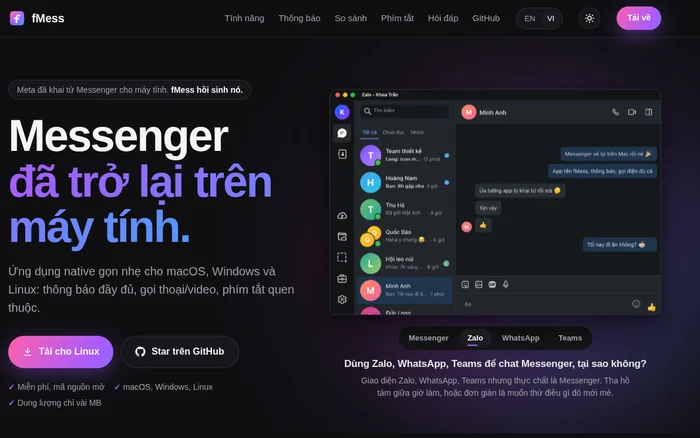
The point that attracts the greatest curiosity about fMess lies in the feature that allows changing the software's display appearance to the interface of other popular messaging applications such as Zalo, WhatsApp or Teams. According to a humorous share from author Toan Ho himself, this feature helps users comfortably chat on Messenger during working hours while outsiders looking at the computer screen still mistakenly think they are exchanging work on Zalo.
In addition to the built-in interface templates including traditional Messenger, Zalo, WhatsApp and Teams, the software settings window also allows users to add custom interfaces via .css format files.
Besides the ability to transform appearance, fMess also impresses with its installation capacity of only a few MB and fast operating speed. To achieve this minimal capacity for all three operating systems including macOS, Windows and Linux, the application directly takes advantage of the webview display component available within each operating system instead of packing a bulky browser.
Regarding information security, the author affirms that fMess is free software, open source on the GitHub platform and absolutely does not collect any data from users. All login operations are performed directly through Facebook's system, so users do not have to worry about the risk of being locked or losing control of their personal accounts.
Despite its compact size, fMess still retains all the same features as the original version and even adds many notable utilities. In terms of communication capabilities, the software fully supports voice and video calling features, including chats protected by end-to-end encryption.
In the call settings section, the application allows activating the calling feature on encrypted conversations, which Facebook has already equipped for browsers similar to Safari but has not yet expanded to all users, and allows turning it off if the calling process encounters an error.
The daily use experience on the computer is also carefully cared for through an original notification system that clearly displays the sender's avatar and allows quick reply input right on the notification banner. The application always runs in the background with an icon in the system bar and displays the number of unread messages right in the Dock.
In particular, users can turn on the feature to hide typing status to comfortably edit documents without the other side seeing the familiar warning line on the screen. Keyboard and touchpad controls are also optimized with the key combination ⌘K to search, ⌘1-9 to quickly switch between conversations, ⌘+ or ⌘- and ⌘0 to customize the text size, and two-finger pinch or double-click to zoom in smoothly.
In addition, the centralized settings area also supports sound adjustment, do not disturb mode, automatic dark mode according to the system and synchronization with the phone.
Besides a series of advantages, author Toan Ho also frankly pointed out the technical limitations of the product he created. Because the nature of fMess is an application that encapsulates a web interface, the developer cannot deeply intervene in the internal operating structure of the platform.
Therefore, in times when the Messenger version on the web browser experiences slow or jerky response, the fMess application on the computer will also be similarly affected.