ASUS Zenbook 14 2026 in hand: Beautiful, compact design that accompanies every day but performance is not "light"
Executive Briefing
Synthesized and verified with gemini-2.0-flash-thinking-exp
“**Not only attractive by its thin and light body, ASUS Zenbook 14 2026 also has a 3K OLED screen and”
Key Takeaways
- 1.**Not only attractive by its thin and light body, ASUS Zenbook 14 2026 also has a 3K OLED screen and performance that meets modern working rhythms.** Choosing a laptop for work has never been simple.
- 2.Creative people need good enough performance to process images, office workers care more about keyboards and battery life, and people who often travel will prioritize a compact device.
- 3.A powerful laptop often comes with a heavy body, while products that are too thin and light sometimes have to compromise performance.
Not only attractive by its thin and light body, ASUS Zenbook 14 2026 also has a 3K OLED screen and performance that meets modern working rhythms.
Choosing a laptop for work has never been simple. Creative people need good enough performance to process images, office workers care more about keyboards and battery life, and people who often travel will prioritize a compact device.
A powerful laptop often comes with a heavy body, while products that are too thin and light sometimes have to compromise performance. The new generation ASUS Zenbook 14 was created to balance these two factors.
The device is only 13.9mm thick, weighs about 1.2kg but is still equipped with an Intel Core Ultra 9 Series 3 processor, 24GB RAM and a 14-inch OLED screen. This is not a gaming laptop or professional graphics workstation, but if you need a compact device for work, content creation, and occasional entertainment, the Zenbook 14 is a notable choice.
Right from the moment of opening the box, Zenbook 14 feels like discovering a high-end item. The way the machine is gently lifted from the tray, the uniform Arctic Blue tone and the cover paper printed with the words "Design you can feel" create a neat experience from the start.
This message also reflects the true spirit of the product: beauty is not only to be seen, but can also be felt through the Ceraluminum surface, the finish and the gentle feeling when holding the device in your hand.
Slim and light design, high-end finishing
The first highlight of ASUS Zenbook 14 is portability. The device is light enough to carry in a backpack every day without feeling heavy. The 14-inch size also creates a balance between display space and mobility.
Despite its slim body, the Zenbook 14 still feels sturdy thanks to its metal chassis. The hinge keeps the screen stable, while the overall design is completed in a minimalist style, suitable for both office environments and personal use.
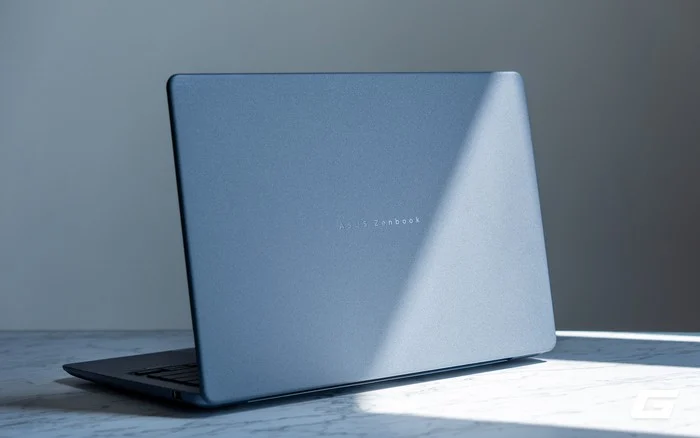
The lid uses ASUS's exclusive Ceraluminum material. This is a finish created by direct oxidation of the aluminum surface, helping to form a texture with high hardness and a touch similar to ceramic. This process not only creates a different appearance but also helps the surface limit scratches, fingerprints and common wear and tear during use.
The corners and edges of the device are softly rounded, creating a smooth feeling when touching or holding the device, not sharp or scratching the palm of the hand.
The version in the article has Arctic Blue color. Light blue tones inspired by the icy landscape create a modern feel without being too prominent. The color of the device also changes slightly according to lighting conditions: under a strong light source, the blue color appears clearer and brighter, while in shaded areas or under indoor lights, the surface tends to turn dark gray-green.
Despite having a quite thin body, Zenbook 14 still has a relatively complete connection system. The device is equipped with one Thunderbolt 4 USB-C port, one USB 3.2 Gen 2 Type-C port, one USB 3.2 Gen 1 Type-A port, one HDMI 2.1 port and a 3.5mm combo audio port.
Both USB-C ports support video output and Power Delivery. Users can connect an external display, high-speed storage drive, or compatible charger without having to rely entirely on a switching hub.
The fact that ASUS retains the USB-A port is also a plus, especially for those who still use mice, USB sticks or accessories that have not yet switched to USB-C.
Beautiful OLED screen, good input experience
The Zenbook 14 version in the article is equipped with a 14-inch OLED screen, 16:10 ratio and resolution of 2,880 x 1,800 pixels. The screen can operate at 60Hz or 120Hz, and also offers Dynamic mode to automatically switch scanning frequency depending on the content being displayed.
When you need to scroll pages, watch movements or perform quick actions, the screen can switch to 120Hz for a smoother feel. For static content or tasks that do not require high refresh rates, the system can lower to 60Hz to reduce power consumption. Users therefore do not have to switch manually every time they want to balance smoothness and battery life.
Compared to the traditional 16:9 ratio, the 16:10 screen provides more vertical display space. This is especially useful when reading documents, editing content, working with spreadsheets or browsing the web because users can see more information and reduce the amount of scrolling. The thin screen border helps the screen-to-body ratio reach 89%, contributing to keeping the overall size of the device compact despite still possessing a 14-inch display space.
This is a screen that does not support touch. Users will not be able to control Windows directly by touching the screen like on some other Zenbook 14 configurations. This does not much affect the normal working experience, and also makes the screen surface less prone to fingerprints.
The OLED panel is one of the device's strongest points. 3K resolution delivers sharp images, while deep blacks, high contrast and vivid colors give content visibly more depth than conventional LCD screens.
The screen covers 100% of the DCI-P3 color space, suitable for the needs of watching movies, editing images and creating content. TÜV Rheinland and SGS Eye Care certifications also help reduce the impact of blue light when using the device for long periods of time.
0.2ms response time combined with a maximum refresh rate of 120Hz helps movements on the screen appear fast, clear and smooth. The difference is noticeable when scrolling web pages, moving windows, watching high frame rate videos, or working with applications that involve a lot of movement.
MyASUS and ScreenXpert add useful utilities to everyday experiences. MyASUS focuses on monitoring hardware status, updating the system, diagnosing devices and customizing operating modes; while ScreenXpert supports window arrangement, saving application groups and quick access to commonly used settings, making multitasking more convenient.
Accompanying the screen is a two-magnet multi-speaker system that supports Dolby Atmos. According to ASUS, this design makes the sound fuller, enhances the bass range and improves clarity up to three times. Dolby Atmos adds spatial sound effects, making the experience of watching movies and listening to music more vivid.
In actual use, the speaker produces clear sound and meets the needs of online meetings, watching videos or listening to music. Due to the limitations of the thin body, the amount of bass is difficult to match with a dedicated external speaker, but the overall quality is still good for a compact laptop.
The keyboard uses white backlighting, not RGB. This is not a minus point because the device is aimed at work, not a gaming laptop; White light creates an elegant feel and helps you see the keys better in low-light environments. The distance between the keys is reasonable, while the 1.7 mm key travel provides clear feedback. The keyboard is suitable for people who often edit documents, process emails or enter data for long periods of time.
Due to the limitations of the 14-inch body, the Zenbook 14 does not have a separate number pad. This is not a big problem for most users, but can be inconvenient if work often requires entering a lot of data.
The physical touchpad has a large size, smooth surface and accurate finger tracking. Multi-point operations in Windows are recognized well, helping users work comfortably even without carrying a mouse.
Real performance and battery life
The tested version uses an Intel Core Ultra 9 386H processor with 16 cores and 16 threads, combined with 24GB of LPDDR5X RAM and a 512GB PCIe 4.0 SSD.
This configuration is powerful enough for most current work needs, from web browsing with multiple tabs, document processing, spreadsheets and online meetings to basic programming, image editing and video editing.
24GB RAM provides plenty of space for multitasking and creative applications. However, RAM is soldered directly on the board so it cannot be upgraded after purchase. The 512GB SSD is enough for the operating system, applications and a moderate amount of data, but those who regularly store RAW photos or videos may need to add an external hard drive or upgrade to other versions.
All benchmarks in the article were performed when the device was placed in Performance Mode. Particularly, Geekbench 7 CPU is run under two conditions: plugged in to the charger and using the battery.
When plugged in, the device reached 2,612 single-core points and 16,658 multi-core points in Geekbench 7. When switching to battery use, the result was 2,575 single-core points and 16,100 multi-core points.
Thus, performance is reduced by about 1.4% in single core and 3.3% in multi-core. The device still maintains about 98.6% single-core performance and 96.7% multi-core performance when not plugged in.
On the Zenbook 14, the Core Ultra 9 386H shows the ability to maintain very good battery performance. The decline of only 1.4% in single-core and 3.3% in multi-core shows that Panther Lake and ASUS's power management mechanism have significantly limited the performance drop when unplugging, a point that has caused many Windows laptops using Intel chips to be complained about in the past.
In Cinebench 2026, Zenbook 14 scored 507 single-threaded points and 3,903 multi-threaded points, with a multi-threaded ratio of 7.70x. The results show that the Core Ultra 9 386H is capable of handling both tasks requiring single-core speed and tasks that take advantage of multiple CPU cores.
PCMark 10 recorded a total score of 8,147, reflecting the ability to quickly handle common tasks such as launching applications, browsing the web, online meetings, writing content and working with spreadsheets.
Core Ultra 9 configuration with 24GB of RAM allows the device to switch between many applications without delay. Office users, students, programmers and those who frequently work in the browser will have plenty of performance room.
Zenbook 14 scored 8,737 points through running PugetBench for Photoshop at Standard settings. The results show that the device can handle common operations well such as opening RAW files, resizing images, using Camera Raw, selecting subjects, blurring, denoising, Smart Sharpen and saving files in many formats.
This is a performance level suitable for photographers, content creators, or users who frequently edit images on the go. Projects with very high resolutions, hundreds of layers, or that require continuous batch processing are still better suited to a system with a large heatsink and a discrete GPU.
In Geekbench 7 GPU, the device scored 22,407 OpenCL points and 23,375 Vulkan points. In 3DMark Time Spy, the device achieved a total score of 3,355, of which the graphics score was 2,980 and the CPU score was 11,742.
Steel Nomad Light recorded 2,107 points with an average speed of 15.61 fps. The heavier Steel Nomad scored 477 points and 4.77 fps. In Solar Bay, the ray tracing performance test, the device scored 11,892 points and 45.22 fps.
These results reflect the true position of the Zenbook 14. With CS2, the integrated GPU can reach about 80-100 fps at 1,920 x 1,200 pixel resolution and Medium settings. The device can even run Cyberpunk 2077 at about 40 fps with Medium settings, Full HD resolution, when image upgrading and frame generation with Intel XeSS are enabled. This is not a gaming laptop, but the performance is enough for eSports games, light games and even some AAA games if the user accepts adjusting the graphics settings.
The device can also support video editing and creative tasks that take advantage of the GPU. However, professional video editors, complex effects creators or 3D designers should still choose a device with a discrete graphics card.
Zenbook 14 is equipped with a 50 TOPS NPU, meeting Microsoft's Copilot+ standards. This dedicated processor excels at frequently run AI tasks such as live captioning, voice recognition, background blur in video calls, OCR, image description and segmentation. NPUs can also operate small language models optimized for Windows with lower power consumption than CPUs or GPUs.
Actual mining ability still depends on the level of support of each software. NPUs are not designed to replace GPUs for heavy lifting like video creation, complex AI rendering, or running large language models, but provide clear benefits for lightweight AI features, continuous operation, and prioritizing battery life. As the Copilot+ application ecosystem expands, 50 TOPS hardware will also have more opportunities to take effect.
Regarding heat dissipation, ASUS equips a larger single fan and redesigns the airflow to dissipate heat more effectively. The system also has the ability to limit dust, and supports power levels of up to 35 W, 25% higher than the previous generation. When handling light tasks, the machine operates relatively smoothly; Fan noise only becomes clearer when running benchmarks, playing games or using Performance Mode for long periods of time.
Zenbook 14 is equipped with a 70 Wh battery, quite large capacity for a thin and light 14-inch laptop. In daily use with multi-tab browsing, text editing, email processing, video watching and light image editing, the device can handle a full work day without having to constantly find an outlet. A 3K OLED screen at 120 Hz will consume more power, so switching back to 60 Hz and using Balanced mode can extend usage time.
The device comes with a 68W USB-C charger. ASUS announced that the battery can reach 60% after about 49 minutes when the device is turned off or in standby mode. Using USB-C also allows users to share the charger with other compatible devices or charge the device with a backup battery of appropriate capacity.
Conclusion
ASUS Zenbook 14 aims for a balance between performance, portability and user experience instead of chasing maximum power. The thin and light body, good build quality and elegant design make the product suitable for those who often work in multiple locations.
The Intel Core Ultra 9 386H version combined with 24 GB of RAM satisfies the needs of multitasking, programming, image editing and moderate video editing. Integrated graphics cannot replace a discrete GPU, but are still capable of handling basic creative tasks and some games at the right settings.
The 3K OLED screen with a maximum refresh rate of 120Hz, comfortable keyboard, practical connectivity system and 70Wh battery continue to reinforce the versatility of the device. In addition to the Core Ultra 9 configuration in the article, Zenbook 14 also has options from Core Ultra 5 325 to Core Ultra 7 355, helping users easily balance usage needs and budget.
Current versions have reference prices from 39,990,000 to 50,990,000 VND at dealers. Zenbook 14 is a worthy choice for office workers, students, programmers and content creators who need a high-end Windows laptop that is easy to carry but still powerful enough for work.