Experience Anker MagGo 2 Pro: the cooling fan makes a difference for many charging situations
Executive Briefing
Synthesized and verified with gemini-2.0-flash-thinking-exp
“## **Seamless design, convenient kickstand when used with iPhone** The first feeling when holding t”
Key Takeaways
- 1.## **Seamless design, convenient kickstand when used with iPhone** The first feeling when holding this Anker charger is that the finish is quite good.
- 2.The plastic panels are tightly assembled, the edges on both sides are curved, so when held separately or attached to the back of the iPhone, it does not cause a feeling of strain in the hand.
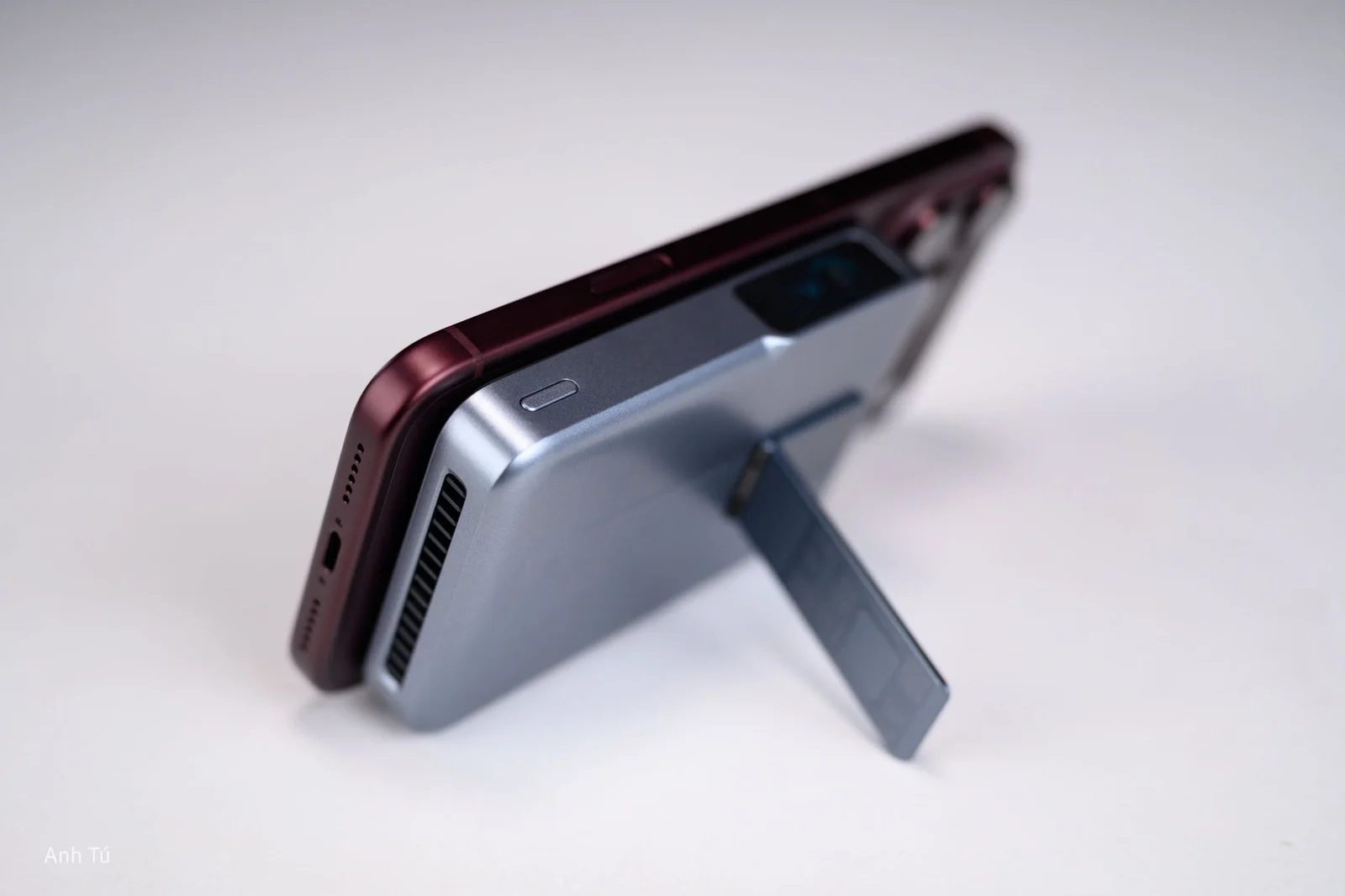
- 3.The highlight that attracts attention in the design is the integrated rear kickstand.
Seamless design, convenient kickstand when used with iPhone
The first feeling when holding this Anker charger is that the finish is quite good. The plastic panels are tightly assembled, the edges on both sides are curved, so when held separately or attached to the back of the iPhone, it does not cause a feeling of strain in the hand. The highlight that attracts attention in the design is the integrated rear kickstand. When I sit down to work, I can put the battery in my iPhone and then stand it horizontally to charge and use the iOS standby interface. When you need to make video calls or record content, the stand can also stand the device vertically.
The magnet is strong, but the cooling fan is the notable point
MagGo 2 Pro's magnetic attraction is quite strong. When you bring the iPhone closer, the battery aligns itself to the correct position of the charging coil and sticks firmly. I tried shaking the camera quite strongly but did not see the two devices move significantly, so it can be rotated horizontally or vertically depending on the usage situation. Anker is equipped with a 38-blade mini fan, combining three layers of graphene material and air vents to actively remove heat. This is an interesting solution because heat is a big problem with high-power wireless charging: when the temperature increases, the system may have to reduce capacity to protect the battery and device.
In actual use, even when attaching the battery and using the iPhone to record video, the contact area does not heat up as much as we often experience with passive wireless charging batteries. The fan runs continuously but the sound is quite low; at normal usage distances it is almost unnoticeable.
Turning on the fan helps shorten the battery charging time by nearly 25%
I tried two modes in the same test to see how the cooling system affects the ability to maintain power.
- In both cases, the peak power via USB-C reaches about 43–43.5W, which is quite close to the maximum announced level of 45W. Big differences appear when the charging process is prolonged.
- In normal mode, the test is completed in about 1 hour 40 minutes 56 seconds. When active cooling is enabled, the time drops to about 1 hour 15 minutes 49 seconds, nearly 25 minutes faster, or about 25%.
The average current in fan mode is also about 33.6% higher.
Advertisement
This shows that the value of the cooling system does not lie in pushing peak power higher, because both modes can reach over 43W. The key point is the ability to maintain high power levels for longer when temperatures are controlled.
The fan of course also consumes some power from the battery. But in return, the time to complete the test is significantly reduced. To me, this is the reason the fan system on this battery really makes sense.
Simulate airflow from the top edge of the battery to the bottom. Can you see the flow of smoke being sucked in and out, it's very easy to visualize.
Qi2.2 25W makes wireless charging more practical
MagGo 2 Pro supports Qi2.2 with a maximum wireless charging capacity of 25W. This is the power level that makes the magnetic backup battery experience begin to differ significantly from previous 7.5W or 15W solutions. Advertisement
The front TFT screen is also more useful than I thought. When the iPhone is attached, the device recognizes the phone and displays information such as remaining battery percentage, current power and operating temperature.
During use, I observed the capacity changing from time to time, from about 15W, 18W to more than 20W. The displayed temperature is usually in the range of 27–35°C depending on usage conditions.
Thanks to that, I can know what the battery is actually doing instead of just looking at a few LED capacity indicators like on traditional backup batteries.
Try charging iPhone 18 Pro Max from very low battery level:
I performed two tests to check the actual charging speed. In the first test, the iPhone 18 Pro Max completely drained the battery and needed about 5 minutes of charging to restart at 1%. This time period is mainly the recovery period from a depleted battery state, so it does not accurately reflect the charging speed after the device has been operating.
Therefore, in the next test I started measuring when the iPhone had 1% battery left. After 5 minutes, the machine reaches 9%; 15 minutes reaches 34%; 30 minutes reached 46%; 40 minutes reached 58%; 50 minutes reached 68% and after one hour reached 77%.
In this second test, the capacity displayed on the backup battery decreased from 100% to 39% after an hour. Thus, if you skip the boot stage from a completely depleted state, Anker can bring the iPhone 18 Pro Max from 1% to 46% after 30 minutes and 77% after 60 minutes.
So it can be seen that after 30 minutes, the iPhone's depleted battery level increased to 46%; After one hour it was 77%. With the need to take the battery out to save the phone in the middle of the day, this is a much more meaningful capacity.
If converted according to the nominal capacity of 39.2 Wh and the test data, the backup battery used about 23.91 Wh to bring the iPhone to 77%, corresponding to about 15.4 Wh of accumulated energy according to the estimate. The conversion efficiency according to this calculation is about 64.4%.
This number should be understood as an estimate from the nominal capacity and battery percentage, not a direct measurement of the power entering the iPhone's cell. But it's still useful to visualize the actual amount of energy you can extract from the battery.
Charging two devices at the same time still exploits about 2/3 of the nominal capacity
I continued to test the ability to power multiple devices at the same time with iPhone 15 Plus and Galaxy S26 FE. iPhone 15 Plus increased from 10% to 73%, while Galaxy S26 FE increased from 10% to 95%. The total energy received by the two devices by conversion from battery capacity is about 26.15 Wh.
Compared to the 39.2 Wh nominal capacity of the Anker battery, the system efficiency is estimated at 66.7%.
This test is also more practical than simply plugging a device into the load meter. Just try to imagine that among the items technology enthusiasts carry every day, there is not always only an iPhone; Sometimes it's necessary to save a second phone or another USB-C device. MagGo 2 Pro can divide power to handle this situation instead of forcing itself to charge one after another.
Pass-through: one charger for both backup battery and phone
Another situation I'm quite interested in is pass-through: plugging in the power source to recharge the Anker battery while letting the battery continue to power another device. With this type of use, what I often worry about with previous products is increased temperature, or simply that the backup battery does not support both charging and output. After 30 minutes, the battery backup increased by about 20%, and the iPhone 15 Plus increased by about 26–28%. The amount of electricity put into the phone during this period is estimated to be about 4.41–4.75 Wh.
At about 1 hour and 17 minutes, Anker's battery reached 50%. About three minutes later, the iPhone 15 Plus reached 56%.
During the testing process, I did not encounter any interruption in charging. However, this is also one of the situations that generates more heat because the electricity has to go through multiple conversion stages. The active cooling system therefore continues to be useful.
Pass-through is especially convenient when traveling: at night, when you only need one charging source, you can plug in the backup battery and let it continue to power the phone, instead of having to carry multiple chargers or wake up to change devices.
Recharges nearly 45W, can continue to carry in more than an hour
The USB-C port supports a maximum capacity of 45W for both power supply and battery recharging needs. In my measurements, the actual power can reach about 43–43.5W, quite close to the design parameters. And you can see that the size of MagGo 2 Pro is no bigger than other wireless rechargeable batteries with the same battery specifications. This is an important point with backup batteries: large capacity doesn't mean much if it takes several hours to recharge each time you use it. The device's body also records an energy capacity of 39.2 Wh, much lower than the 100 Wh threshold often used for lithium batteries carried in hand luggage on flights. Therefore, in terms of energy capacity alone, this is still a suitable size for travel needs.
The new cooling fan is what makes MagGo 2 Pro different
After the tests, the most convincing point on the Anker MagGo 2 Pro for me is still the active cooling fan system. Not only does it help the device stay cooler when wirelessly charging, but test results also show better capacity retention, thereby significantly shortening charging time under heavy load conditions. The actual peak power via USB-C reaches over 30W, the ability to charge two devices and pass-through both work stably, and the test with iPhone 18 Pro Max shows that the device can replenish a fairly large amount of battery in about 30–60 minutes.
But the most notable result is still the heat dissipation test: at the same peak power level, turning on the fan reduces the completion time from about 1 hour 41 minutes to 1 hour 16 minutes. This shows that the active cooling system not only helps keep the device cooler, but also has a direct impact on the ability to maintain performance during long operation.
Combining a kickstand, strong magnet, TFT screen and Qi2.2 25W, this is the type of backup battery that I find most suitable for those using new iPhones, especially if you often take photos, use your phone on the street or need to charge it while continuing to work.
However, the price of nearly 3 million VND is quite high for a backup battery. You are paying extra for the 25W Qi2.2, screen, stand and especially the active cooling system. If you regularly charge wirelessly, charge while using your iPhone, or need solid performance on the go, these devices make a clear enough difference; For basic backup charging needs, this price will be more difficult to reach.
If you are interested in the product, you can see more here.
Thank you Anker for accompanying me in this article.