HP OmniBook X Flip 14 2026: Intel® Core™ Ultra Series 3 combined with OLED touch screen
Executive Briefing
Synthesized and verified with gemini-2.0-flash-thinking-exp
“**360-degree folding design combined with Intel® Core™ Ultra Series 3 processor and OLED touch scree”
Key Takeaways
- 1.**360-degree folding design combined with Intel® Core™ Ultra Series 3 processor and OLED touch screen helps HP OmniBook X Flip 14 2026 flexibly meet the needs of work, entertainment and content creation.** Laptops that rotate 360 degrees are no longer strange, but to attract users, the ability to convert between laptop and tablet is not enough.
- 2.A 2-in-1 device also needs good performance, a quality screen and utilities to meet diverse working needs.
- 3.HP OmniBook X Flip 14 2026 has a minimalist design, suitable for many working spaces.
360-degree folding design combined with Intel® Core™ Ultra Series 3 processor and OLED touch screen helps HP OmniBook X Flip 14 2026 flexibly meet the needs of work, entertainment and content creation.
Laptops that rotate 360 degrees are no longer strange, but to attract users, the ability to convert between laptop and tablet is not enough. A 2-in-1 device also needs good performance, a quality screen and utilities to meet diverse working needs.
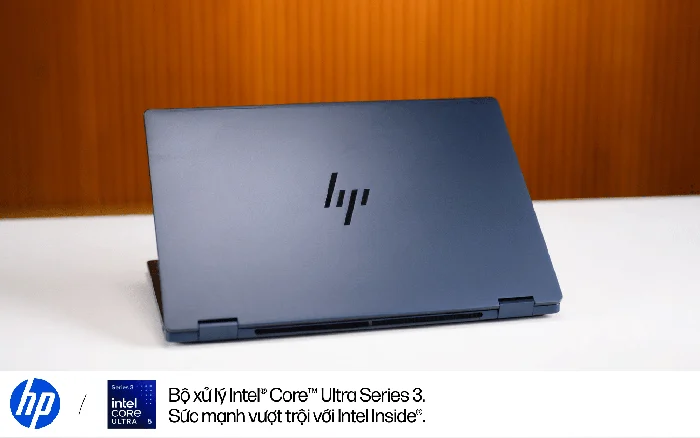
HP OmniBook X Flip 14 2026 has a minimalist design, suitable for many working spaces. Photo: Exquisite
That is also the upgrade direction of the HP OmniBook
Familiar foldable design, adding valuable small changes
The HP OmniBook X Flip 14 2026 maintains a minimalist style with an aluminum body, HP logo on the lid and modern Atmospheric Blue color. The difference lies in the softer rounded edges and corners of the device, which not only creates an elegant feel but also makes it comfortable to hold, especially when the screen is folded upside down to use as a tablet.
The 360-degree hinge is sturdy, has moderate folding and opening force, and keeps the screen stable. Users can switch between laptop mode, take notes with a pen or set up the device in tent mode for presentations. Weighing around 1.4kg, the device is convenient to carry around on a daily basis, while tablet mode is more suitable for quick note-taking, document reading or sketching situations.
Tablet mode is convenient for reading documents, taking notes, and viewing content. Photo: Exquisite
Another practical change lies in the connection port layout. Instead of placing both USB-C ports on the same side like the previous generation, HP has switched to arranging them on both sides of the body, making it more convenient to plug in a charger or connect a peripheral device. The device is equipped with two Thunderbolt 4 ports, two USB-A, HDMI 2.1 and a 3.5mm headphone jack.
The included 65W USB-C GaN charger is also more compact in size than a traditional laptop charger, helping to reduce the bulkiness when carrying the device to work or traveling frequently.
Intel® Core™ Ultra Series 3 Processor: Performance that meets your work and creative needs
One of the notable upgrades on the HP OmniBook X Flip 14 2026 is the new Intel® Core™ Ultra Series 3 processor. The tested version is equipped with Intel® Core™ Ultra 5 325 processor, 16GB RAM and 512GB SSD. This processor has 8 cores, 8 threads, including 4 high-performance cores (P-core) and 4 low power-saving cores (Low Power E-core), 12MB cache and a maximum clock speed of 4.5GHz.
In actual use, the machine handles office tasks well such as drafting documents, working with spreadsheets, opening multiple Chrome tabs or continuously switching between applications. Combined with 16GB RAM, this configuration comfortably meets daily multitasking needs.
Intel® Core™ Ultra Series 3 processors deliver performance that meets everyday multitasking and content creation needs. Photo: Exquisite
In terms of performance, the HP OmniBook Geekbench multi-core scores are relatively positive, while Cinebench shows a gap with more powerful CPU configurations in rendering tasks.
For creative work such as image editing, basic graphic design or not too complicated project handling, this configuration is an option to consider. However, people who often do 3D rendering or heavy video rendering should prioritize higher configurations. When running under prolonged load, the machine recorded a decrease in clock speed as the temperature increased, although the keyboard and palm rest areas were still relatively well controlled.
Quality OLED display, touch and pen for added versatility
HP OmniBook X Flip 14 2026 is equipped with a 14-inch OLED screen, 1920x1200 pixel resolution, touch support and stylus. The screen provides vivid colors, good contrast, with measured color coverage reaching 100% sRGB, 97% DCI-P3 and 92% AdobeRGB, meeting entertainment and image editing needs.
With a resolution of 1920x1200 pixels and a 60Hz refresh rate, the screen satisfies common working and entertainment needs. Those who prioritize sharpness or smoother motion may want to consider higher resolution and refresh rate screen options. In return, touch capabilities and pen support make taking notes directly on documents, sketching ideas or manipulating content more convenient.
14-inch OLED screen with 16:10 ratio, vivid colors and high contrast, suitable for both work and entertainment. Photo: Exquisite
The keyboard is another plus point with good bounce, reasonable key travel and an easy-to-get-to-get-to layout. Even though the keys are located relatively close together, the distance between the key centers is still comfortable enough to type text for long periods of time. The device also has a backlight to support working in low-light environments.
The touchpad has an appropriate area, recognizes operations well and meets daily use needs. The surface has slight friction when moving your fingers, providing a different operating feeling compared to glass-covered touchpads.
Battery life meets mobile needs, adding useful smart utilities
The HP OmniBook This is a positive result for a laptop aimed at mobility, although the actual duration depends on workload and usage settings.
Besides hardware, HP adds utilities to support multi-screen work. Notably, Look to Move, a feature that allows application windows to be moved between screens via head movements, adds a method of interaction besides drag and drop with the mouse. Meanwhile, Screen Shift helps arrange windows into the working layout with just one operation, convenient when connecting a laptop to an external monitor.
Smart widgets support window arrangement and management when working with multiple monitors. Photo: Exquisite
In terms of AI processing capabilities, the Intel® Core™ Ultra 5 325 processor integrates an NPU with a maximum performance of 47 TOPS INT8, supporting features such as Windows Studio Effects. Combined with HP software utilities, this platform contributes to expanding interaction capabilities and supporting users in their daily work.
A versatile laptop for users who need flexibility
The HP OmniBook The product is suitable for office users, content creators or those who need a flexible device.
Overall, the OmniBook X Flip 14 2026 offers a balanced combination of performance, portability and interactivity, suitable for users who need a flexible laptop for daily work.