[QC] HP OmniBook X Flip 14 2026 upgrades folding design with Intel® Core™ Ultra 3 processor
Executive Briefing
Synthesized and verified with gemini-2.0-flash-thinking-exp
“**HP OmniBook The ability to rotate 360 degrees has long been a familiar part of HP's 2-in-1 lapt”
Key Takeaways
- 1.**HP OmniBook The ability to rotate 360 degrees has long been a familiar part of HP's 2-in-1 laptop lines.
- 2.With OmniBook X Flip 14 2026, users therefore have reason to ask another question: after one generation, what new features does the device have?
- 3.After the 2025 version experienced by Delicate, OmniBook X Flip 14 returns with changes that can be recognized as soon as you hold the device and start using it.
**HP OmniBook
The ability to rotate 360 degrees has long been a familiar part of HP's 2-in-1 laptop lines. With OmniBook X Flip 14 2026, users therefore have reason to ask another question: after one generation, what new features does the device have?
After the 2025 version experienced by Delicate, OmniBook X Flip 14 returns with changes that can be recognized as soon as you hold the device and start using it. The main character in today's review is the HP OmniBook X Flip 14 2026, which I have been experiencing for about a week. The version being used is HP OmniBook
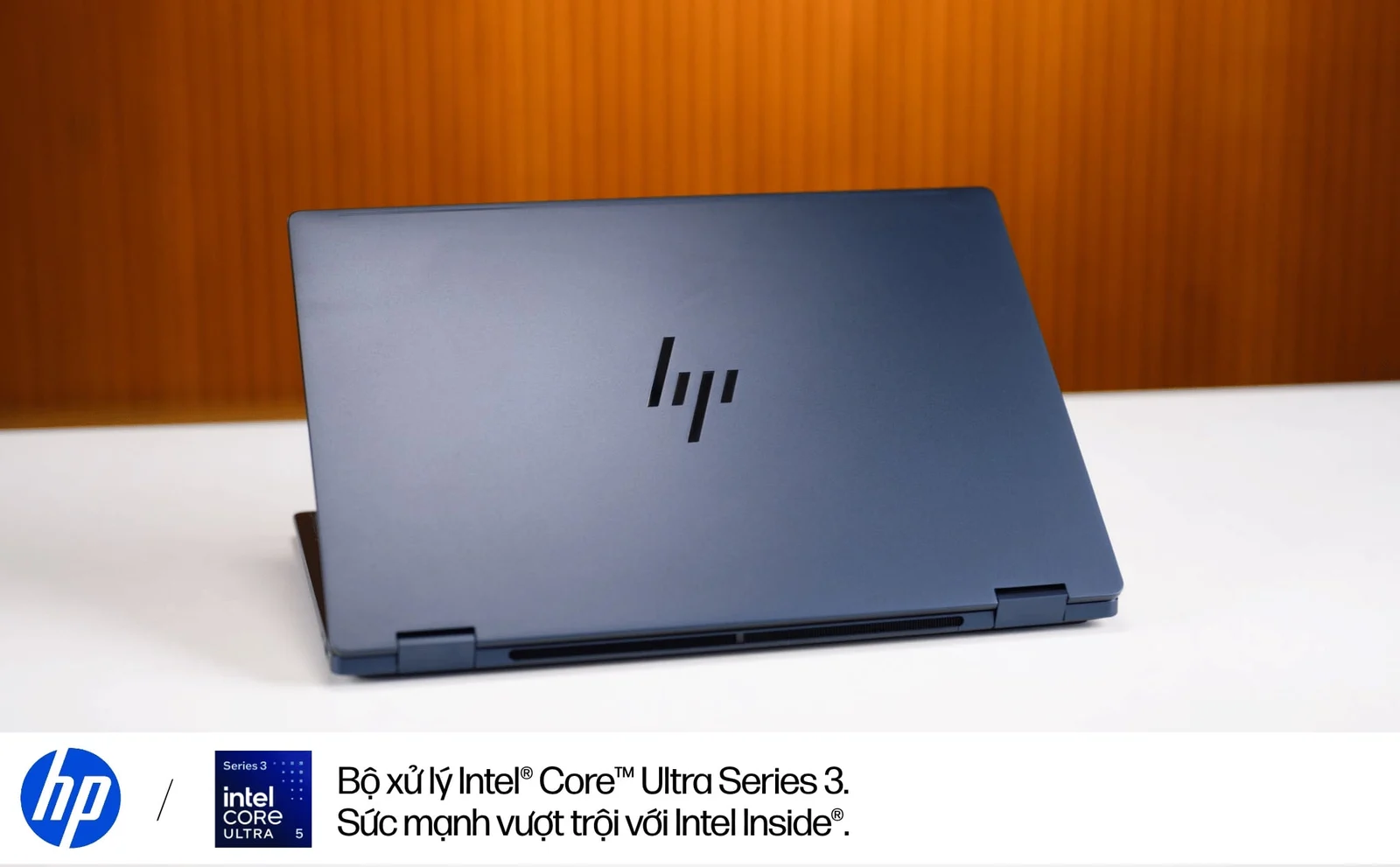
This is the latest flagship 360-degree folding laptop model from HP. The device has a brilliant 14-inch Full HD OLED touch screen, supports a stylus for a natural writing and drawing experience, and inspires all ideas with the new Intel®️ Core™️ Ultra Series 3 processor and the outstanding power of Intel Inside®️.
Who is HP OmniBook X Flip 14 2026 for?
OmniBook It could be an office worker, a content creator, or someone who regularly edits photos, takes notes, and presents ideas.
For this group of users, the appeal of the Flip line lies in having many ways to operate on the same device. The keyboard does the bulk of the work, while the touch and pen add convenience when you need to work directly with content.
As for designers and creators, I find the configuration I'm testing suitable to consider daily creative needs. Tasks such as 3D rendering or complex video project processing still need to be considered a separate set of needs when choosing a configuration.
Design: noticeable changes are on the sides and corners of the camera
My first impression is that the OmniBook X Flip 14 still retains HP's familiar minimalist style, but the body lines have a softer feel. The rounded corners, combined with Atmospheric Blue tones and the HP logo on the lid, create a modern overall look without the need for many decorative details.
The aluminum body feels sturdy. The rounded lines also work when holding the device, especially when folding the screen back. With a laptop that frequently changes its usage position, this is a detail that directly affects the feeling of touch.
The hinge provides moderate folding and opening force and keeps the screen stable when operating. The ability to rotate 360 degrees continues to be maintained, and the perfect quality of the hinge is what I pay more attention to during use.
The overall weight of the machine is extremely compact, only approximately 1.4kg. When used in tent mode to sketch ideas or demonstrate projects to partners, this design brings outstanding convenience. Especially on business trips or working in narrow spaces like airplane dining tables, the OmniBook X Flip's 360-degree flexibility really brings out its peak value.
The connection port layout also has specific changes. On the 2025 configuration evaluated by Thurrott, two USB-C ports are located on the left edge. In the 2026 version being tested, they are divided into two sides of the device.
I appreciate this arrangement because I have more options when plugging in the charger or connecting peripheral devices. The cables are easy to arrange according to the location of the power source and screen, instead of having to go around the body of the device. In addition, the device has two Thunderbolt 4 ports, two USB-A, HDMI 2.1 and a 3.5mm audio jack.
The included charger has also been streamlined. HP equips a 65W USB-C GaN charger, with a smaller design than a conventional laptop charger. This is a practical detail for people who often carry the device: the compactness comes from both the laptop and the accessory set in the bag.
Comfortable performance for daily work
The processing platform is one of the notable points of the 2026 version. According to Intel, the Core Ultra 5 325 has 8 cores, 8 threads, including 4 P-cores and 4 low-power cores, 12MB cache and a maximum turbo clock of 4.5GHz. This maximum pulse level depends on operating conditions.
During the experience, the machine coped well with office tasks, opening many Chrome tabs and running work management software. With 16GB RAM and 512GB SSD, this configuration can serve your daily usage, from document processing to switching between multiple applications.
In the Geekbench test, the device scored 2,033 single-core points and 10,967 multi-core points. With Cinebench 2026, the results are 389 single-core points and 1,701 multi-core points, respectively.
Overall, the device's Geekbench multi-core score is quite positive in the compared configuration group. When switching to Cinebench's CPU rendering test, the gap with more powerful configurations is clearly evident. For me, this version is suitable for working and creating content every day; People who often do heavy rendering will have a reason to look for higher configurations.
When running for a long time, the machine will reduce the pulse when it heats up. In return, the palm rest area and keyboard are relatively well controlled according to experience. This is a point I rate positively because they are frequently exposed locations during use.
OLED screen and new keyboard design are my favorite parts of the experience
The HP OmniBook X Flip 14 Next Gen AI PC 2026 version uses a 14-inch OLED touch screen, 1920 × 1200 resolution according to HP's official specifications. Colors displayed are vivid. Test results recorded 100% sRGB, 97% DCI-P3 and 92% AdobeRGB coverage, demonstrating the wide color range of the screen under test.
The point I still regret is the resolution and 60Hz refresh rate of the version I experienced. The screen has an advantage in color, but people accustomed to high-resolution panels or higher refresh rates will notice the difference.
The ability to use a pen also gives the screen added value beyond display. For those who are used to taking notes or sketches directly, this is an obvious reason to choose the Flip line.
The keyboard continues to be the part I rate positively. The keys are arranged close together but the distance between the key centers is still easy to get used to. When you put your hand on it to type, it feels quite natural and doesn't take much time to adapt.
The bounce is good, the travel doesn't feel too shallow and there's a backlight when you need to work in low light conditions.
The touchpad has an appropriate area and receives good operations. It's a bit unfortunate that the surface still has a slight squeak when moving your finger, not giving the smooth feeling like a glass-covered touchpad. If this part is further improved, the operating experience will be more uniform with the keyboard and camera body.
Battery life is nearly 10 hours when working continuously
OmniBook X Flip 14 uses a 59Wh battery. In the Procyon Battery Life test with Office applications, the device recorded 586 minutes, equivalent to 9 hours 46 minutes, before the battery reached the 30% mark according to the measurement description.
This is a notable plus point when placed next to the design and working ability of the machine. For those who choose a laptop to carry regularly, this office test run time is a positive result, although the actual duration will vary according to work and usage settings.
Smart utilities for the first time on HP laptops perfect the experience
Besides new hardware, software utilities are worth exploring on the OmniBook X Flip 14 2026, especially when connected to a separate screen.
Look to Move allows windows to be switched between monitors using head movements. Users have an additional way to move the window to the screen they want to use, besides dragging and dropping with the mouse.
Comes with Screen Shift, which supports arranging windows into the working layout with one operation. The two features have different roles: Look to Move helps move windows, while Screen Shift helps arrange them.
For people who often work on multiple screens, these are utilities worth trying. They expand control when the laptop is placed in the desk workspace, complementing the touch and pen that are associated with the Flip line.
The Intel®️ Core™️ Ultra 5 325 NPU reaches up to 47 TOPS INT8 and supports Windows Studio Effects. Besides hardware specifications, recognizable features like Look to Move help make the story about the software on the device more specific.
Conclusion
OmniBook The points I evaluate positively lie in the feel of the grip, hinge and keyboard, while the touchpad surface still has room for improvement.
Currently, the product does not have an official selling price in the Vietnamese market. When it does, I will share it with you guys.
Thank you Intel & HP for accompanying me in this article.