Update on Synology NAS Ransomware case in Korea: many reports sent to KISA, demanding ransom in bitcoin
Executive Briefing
Synthesized and verified with gemini-2.0-flash-thinking-exp
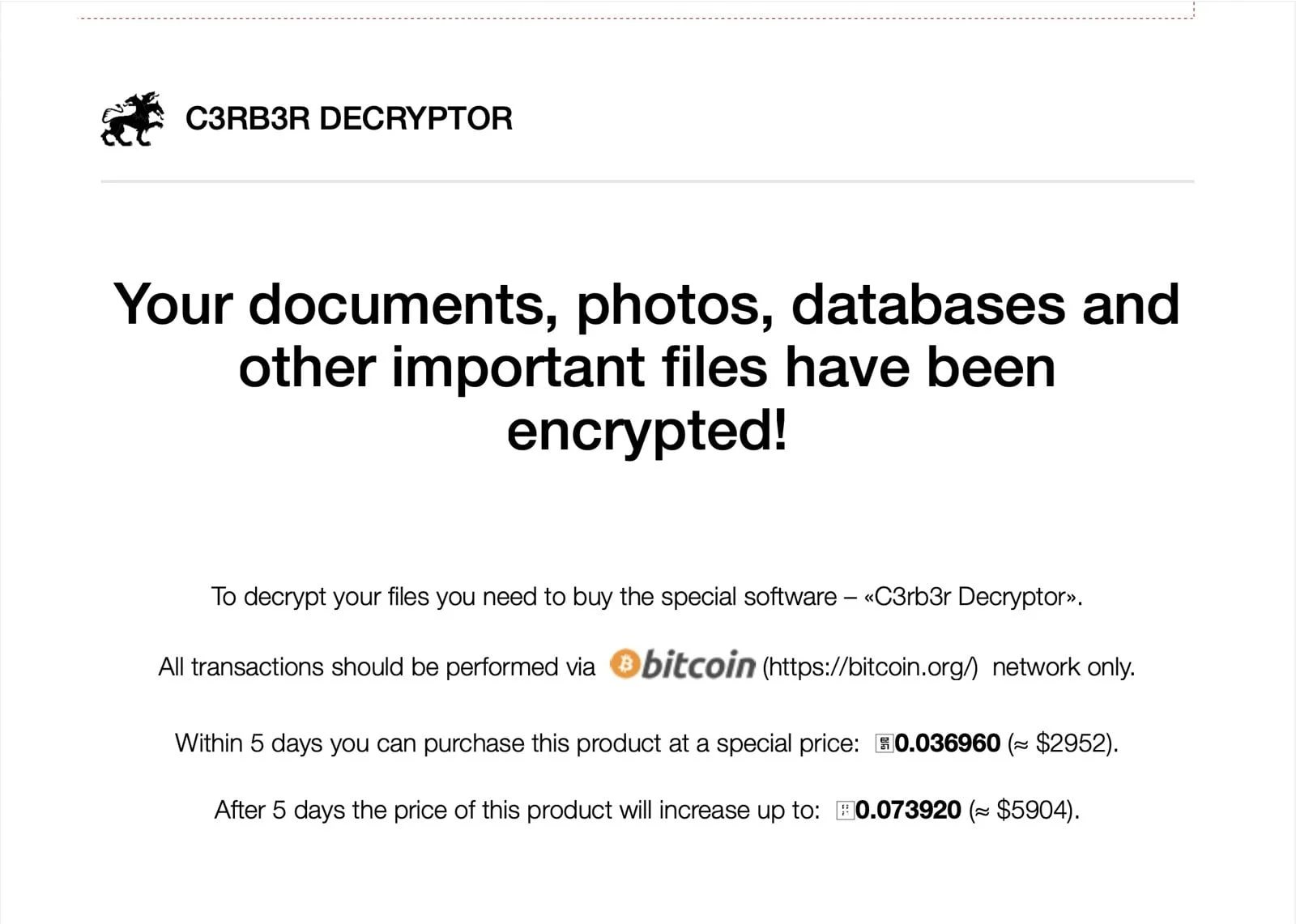
“The cover image is a ransom letter demanding bitcoin in the attack on Synology NAS users in Korea us”
Key Takeaways
- 1.The cover image is a ransom letter demanding bitcoin in the attack on Synology NAS users in Korea using Ransomware, which is currently heating up and has been reported in Vietnam as well.
- 2.I have an article about this Ransomware on NAS, what to do, where to find the patch, you can read more below.
- 3.## Synology warns of ransomware on old DSM NAS: What is ransomware and what do you need to update?
The cover image is a ransom letter demanding bitcoin in the attack on Synology NAS users in Korea using Ransomware, which is currently heating up and has been reported in Vietnam as well.
I have an article about this Ransomware on NAS, what to do, where to find the patch, you can read more below.
Synology warns of ransomware on old DSM NAS: What is ransomware and what do you need to update?
On Thursday, October 29, 2026, Synology issued a notice advising users to update DSM after a series of ransomware attacks targeting NAS machines still running outdated operating system versions, and the key point is that the attack group is exploiting a vulnerability...
Who is the victim?
This article is an update on the situation in Korea with many reports sent to KISA (Korea's cyber incident response agency).
Since Wednesday, October 28, many Synology NAS users in Korea opened their computers to find all their photos and documents locked, no files could be opened, and a ransom letter demanding bitcoin.
The victims were Synology NAS users running old, unpatched versions of DSM, both individuals using it as private clouds and businesses using it as file sharing and backup servers for employees in Korea.
Korean cybersecurity agency KISA said it has received many reports of damage from domestic users since around October 28, but has not announced the specific number of how many machines or how many units are affected.
KISA's technical support team will review each report and then contact the sender for processing instructions. When asked about the scale of damage, cause and time of the first attack, KISA refused to answer in detail.
Not only in Korea, this month there have also been similar cases in other countries. Some analysis reports from third-party security companies also state other vulnerability codes, but Synology has not officially commented so I will not include them here.
How much is the ransom?
In the ransom letter, the attacker wants to get bitcoins at the following levels:
- Initial ransom: 0.036960 BTC, about 2,952 USD (about 4 million won).
- Payment deadline: 5 days.
- Late deadline: doubled to 0.073920 BTC, about 5,904 USD (about 8 million won).
About 4 million won is not a small amount of money for an individual user. No one can be sure if you pay and get your data back or not, so don't consider it a way out.
What should I do if I'm using a Synology NAS?
Advertisement
The first thing is to go to Control Panel to check the DSM version. If it doesn't meet the above versions, update immediately. At the same time, limit opening the NAS directly to the internet if not really needed, especially during this sensitive time and wait for official announcements from Synology.
When creating a backup, it is better to keep it on another drive or a place separate from the NAS, separate from the internal network, because if the backup is on the same computer and is also encrypted, it will mean losing the way to restore.
If the computer is infected, Synology recommends disconnecting the NAS from the network. If you cannot disconnect it, turn off the computer, record the time of the incident, system information, login history and then contact technical support.
Then restore data from a clean backup or snapshot (a snapshot of the file state at a point in time) that existed before the attack.
According to:
ChosunBiz